
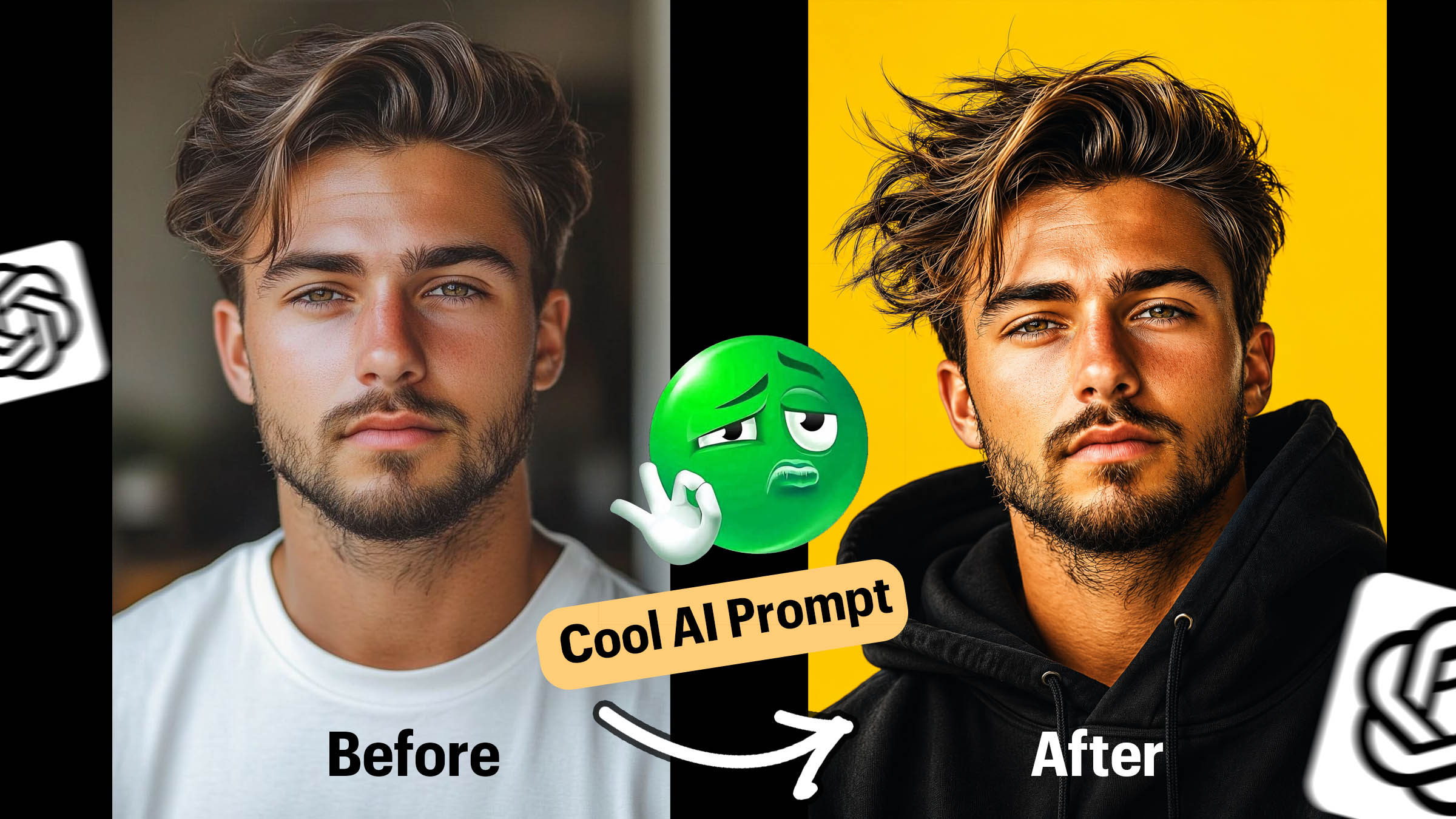
Transform ordinary portraits into dramatic cinematic poster-style artworks with hyper-realistic detailing, dynamic lighting, windswept hair effects, and bold modern aesthetics using AI-generated illustration prompts.
How to Create Hyper-Realistic AI Portrait Illustrations for Modern Posters
Hyper-realistic portrait illustrations are absolutely dominating digital art right now. Walk through any modern design portfolio, scroll your social feed, or look at the latest branding campaigns, and you’ll see them: stunning visuals that blend photorealistic facial details with cinematic lighting, dramatic compositions, and vibrant, punchy backgrounds.
It’s a style that manages to feel simultaneously lifelike and deeply artistic. If you want to elevate your social media presence, upgrade your portfolio, or design eye-catching posters and wallpapers, this guide breaks down exactly how to master the look using AI.
What Makes a Hyper-Realistic Portrait Stand Out?
Achieving this premium poster-art aesthetic isn’t just about telling an AI to “make a pretty picture.” It’s about orchestrating a specific set of visual cues. The most striking portraits focus heavily on these key elements:
- Precise Facial Likeness & Texture: True realism lives in the details. Think visible skin pores, subtle freckles, and authentic textures rather than airbrushed perfection.
- Dynamic Hair Movement: Windswept, individual hair strands that add energy and motion.
- Sharp Eye Reflections: Catchlights in the eyes that give the subject depth and soul.
- Dramatic Close-Up Framing: Tight camera angles that force the viewer to connect with the subject.
- Cinematic Lighting & High Contrast: Soft, directional light paired with deep shadows to create a moody, three-dimensional effect.
- Bold Backdrops & Oversized Fashion: Vibrant, solid-colored backgrounds contrasted with stylish, chunky, or oversized wardrobe pieces.
Prompt:
Create a hyper-realistic portrait illustration based on the provided photograph. The artwork should accurately replicate the subject’s facial features with precise likeness and highly detailed rendering. Capture the face in an intense, emotionally charged expression from a dramatic close-up angle with a slight low-angle perspective
Depict the hair as windswept and dynamic, with sharp, well-defined strands that convey movement and energy. Use bright, even lighting to create soft highlights on the skin and hair, revealing detailed skin texture, fine pores, natural shadows, and vivid reflections in the eyes.
Dress the subject in an oversized black hoodie that looks natural and seamlessly integrated into the scene. Place the subject against a solid, bold background color such as vibrant yellow to create strong visual contrast and impact.
The final illustration should blend semi-photorealistic and semi-illustrative aesthetics inspired by modern poster art, emphasizing dynamic energy, clarity, vibrant colors, cinematic depth, ultra-sharp detailing, and premium visual quality.

The Best Features of the Poster-Style AI Portrait
Why does this specific style work so well? It boils down to a few core design choices that make the artwork instantly recognizable and highly engaging.
1. The Emotional Close-Up
By utilizing dramatic close-up composition, the artwork eliminates distractions. The focus is entirely on the expression, creating immediate emotional depth and a powerful visual presence.
2. High-Contrast, Vibrant Backgrounds
Instead of complex scenes, this style relies on solid, bold backdrops—think electric yellow, deep crimson, fiery orange, or rich cobalt blue. This intense contrast makes the subject practically pop off the screen.
3. The Semi-Photorealistic Sweet Spot
This style thrives in the beautiful middle ground between a high-fashion photograph and a digital illustration. It’s trendy, clean, and incredibly versatile, making it the perfect choice for:
- Instagram grids and TikTok covers
- YouTube thumbnails that actually get clicks
- High-end physical posters and merch
- Sleek desktop and phone wallpapers
- Modern branding and profile pictures
Pro-Tips for Generating Better AI Portraits
Ready to prompt your own? Whether you are using Midjourney, Stable Diffusion, or DALL-E 3, keep these practical tips in mind to get the cleanest, highest-quality results:
💡 Pro-Tip: Don’t just ask for a “person.” Describe the mood. Use words like cinematic lighting, rim lighting, chiaroscuro, or studio portrait to guide how light hits the face.
- Be Specific About Texture: Explicitly mention “fine skin texture,” “detailed pores,” or “natural skin imperfections” to avoid that artificial, plastic look.
- Direct the Hair: Use descriptive action words like “windswept hair,” “stray strands,” or “dynamic motion” to give the portrait life.
- Dictate the Wardrobe: Style your subject. Mention “oversized streetwear hoodie,” “chunky knit collar,” or “minimalist fashion aesthetics” to ground the character in a modern context.
- Specify the Camera Tech: Guide the AI’s perspective by mentioning lens types or framing styles, such as “macro shot,” “85mm lens,” or “shallow depth of field.”
- Call Out the Color Contrast: Explicitly state the background color and its relationship to the subject (e.g., “Subject in dark clothing against a stark, solid vibrant yellow background”).
AI portrait illustration | How to create AI portraits | Hyper realistic AI art | Modern poster design AI | Cinematic AI portrait prompts | Realistic AI character art | How to get realistic skin texture in AI art | AI art portrait tips | AI art for graphic designers 2026 | Digital art trends for social media | Semi photorealistic poster aesthetic | Trendy AI portrait styles | Midjourney portrait prompt guide | Stable Diffusion poster style art | Chatgpt Prompts | How to get realistic skin texture in AI art | AI art portrait tips
Leave a Reply